As digital marketing races into 2026, mastering google gtm code is no longer optional for data-driven teams. Today’s rapid shifts in consumer behavior and technology demand precise, flexible tracking for every campaign and customer touchpoint.
This handbook is your essential guide to deploying, managing, and optimizing google gtm code for maximum marketing impact. You’ll discover the fundamentals, step-by-step setup, advanced tactics for marketers and developers, compliance essentials, and future-proofing strategies to keep your data stack ahead of the curve.
Ready to transform your marketing with actionable solutions and a clear roadmap? Dive in to unlock the full power of google gtm code.
Understanding Google Tag Manager Code: Fundamentals for 2026
As we enter 2026, understanding google gtm code is non-negotiable for any marketer or business aiming to stay competitive. Google Tag Manager (GTM) has evolved into a core technology for digital analytics, marketing, and user experience optimization. Its code-centric approach now underpins rapid deployment, robust data collection, and seamless integration across platforms.
What is Google Tag Manager and Why is it Critical in 2026?
Google Tag Manager is a centralized platform designed to manage and deploy marketing and analytics tags without editing your website’s core code. In 2026, the significance of google gtm code has grown as businesses demand faster, more flexible tracking solutions. GTM streamlines workflows by letting marketers add, update, or remove tags in real time through an intuitive interface.
Traditionally, every new tracking pixel or analytics snippet required direct code changes. With google gtm code, you shift from manual coding to automated tag deployment, reducing both risk and time investment. This shift is crucial as marketing stacks become more complex and data-driven.
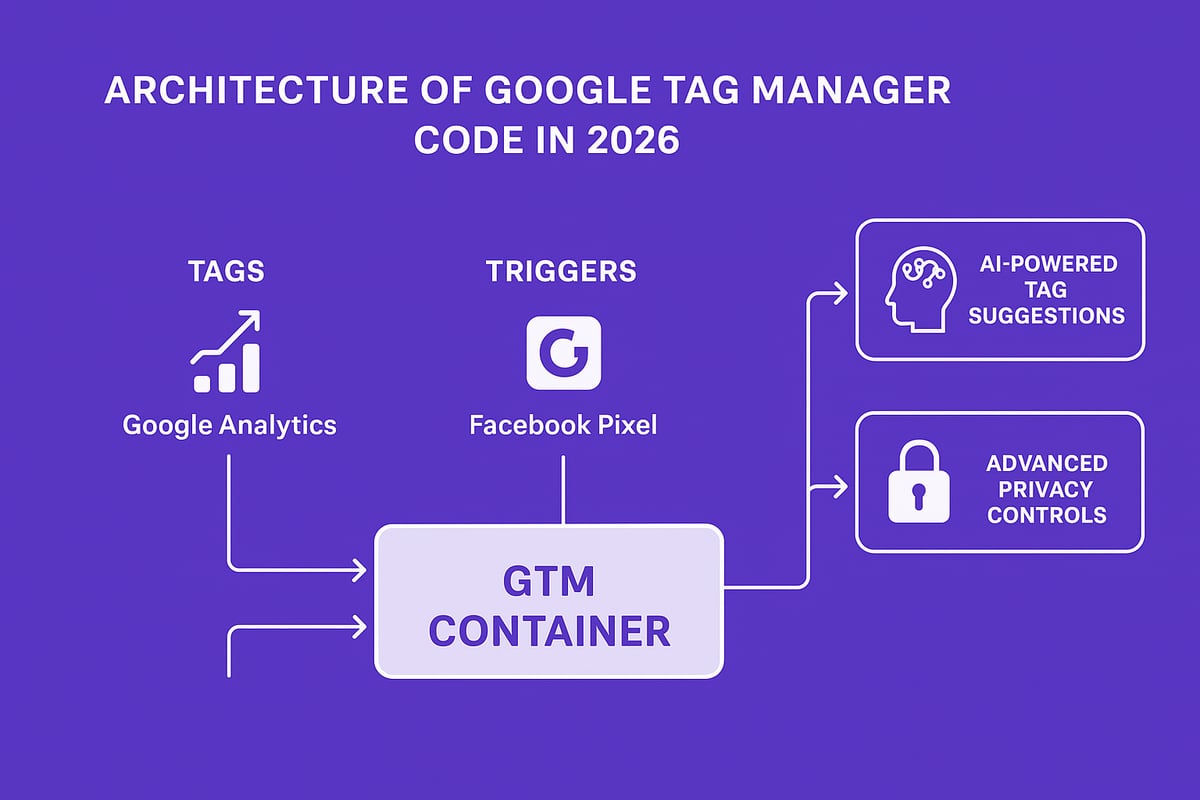
GTM’s role in data collection is bigger than ever. It acts as a central hub, connecting your site to tools like Google Analytics, Facebook Pixel, and emerging AI-driven platforms. For 2026, key updates include smarter tag templates, enhanced privacy controls, and expanded support for server-side tracking. Major brands like Nike and Airbnb now leverage google gtm code to roll out analytics and conversion tracking globally within hours, not weeks.
Types of GTM Code: Tags, Triggers, and Variables
At the heart of google gtm code are three core components: tags, triggers, and variables.
- Tags are snippets of code that send data to third-party tools.
- Triggers decide when and where those tags fire, such as on page load or click.
- Variables store dynamic information, like page URLs or user actions, making your tags smarter and more personalized.
These elements work together in the GTM ecosystem. For example, a Google Analytics tag may fire on every pageview, while a Facebook Pixel tag activates only on conversion events. In 2026, new tag templates and advanced trigger options make setup faster and more granular than ever.
Here’s a quick comparison table of popular tags and their use cases:
| Tag Type | Common Use Case | Example Platform |
|---|---|---|
| Analytics | Traffic tracking | Google Analytics |
| Advertising | Remarketing | Facebook Pixel |
| Lead Tracking | Form submissions | LinkedIn Insights |
According to BuiltWith (2024), 78% of top-performing websites now rely on google gtm code for analytics and advertising tags. For those focused on capturing and managing lead data, check out Mastering lead tracking tactics to see how GTM powers smarter data collection.
Benefits of Using GTM Over Manual Tag Implementation
Adopting google gtm code delivers significant advantages over manual tag management. First, it gives marketing teams unmatched speed and agility. You can launch or update campaigns instantly, without waiting on developers or risking site downtime.
Second, google gtm code reduces reliance on technical teams. Marketers can experiment and iterate quickly, while developers focus on higher-value projects. This separation also keeps your site’s codebase cleaner and more secure.
Third, using GTM improves site performance. Tags are loaded asynchronously, minimizing their impact on load times and user experience. In one real-world case, an e-commerce site cut tag deployment time by 60 percent after switching to GTM.
Common challenges, like tracking errors, duplicate tags, or missed conversions, are solved with built-in debugging tools and version control. Google gtm code transforms tag management from a bottleneck into a growth accelerator for modern businesses.
Step-by-Step Guide: Installing and Configuring Google GTM Code
Implementing google gtm code is a foundational move for every data-driven business in 2026. This guide will walk you through the critical steps to prepare, install, and configure your GTM setup. Whether you're new to tag management or upgrading your stack, following these steps ensures your analytics are robust and future-proof.
Preparing Your Website for GTM Integration
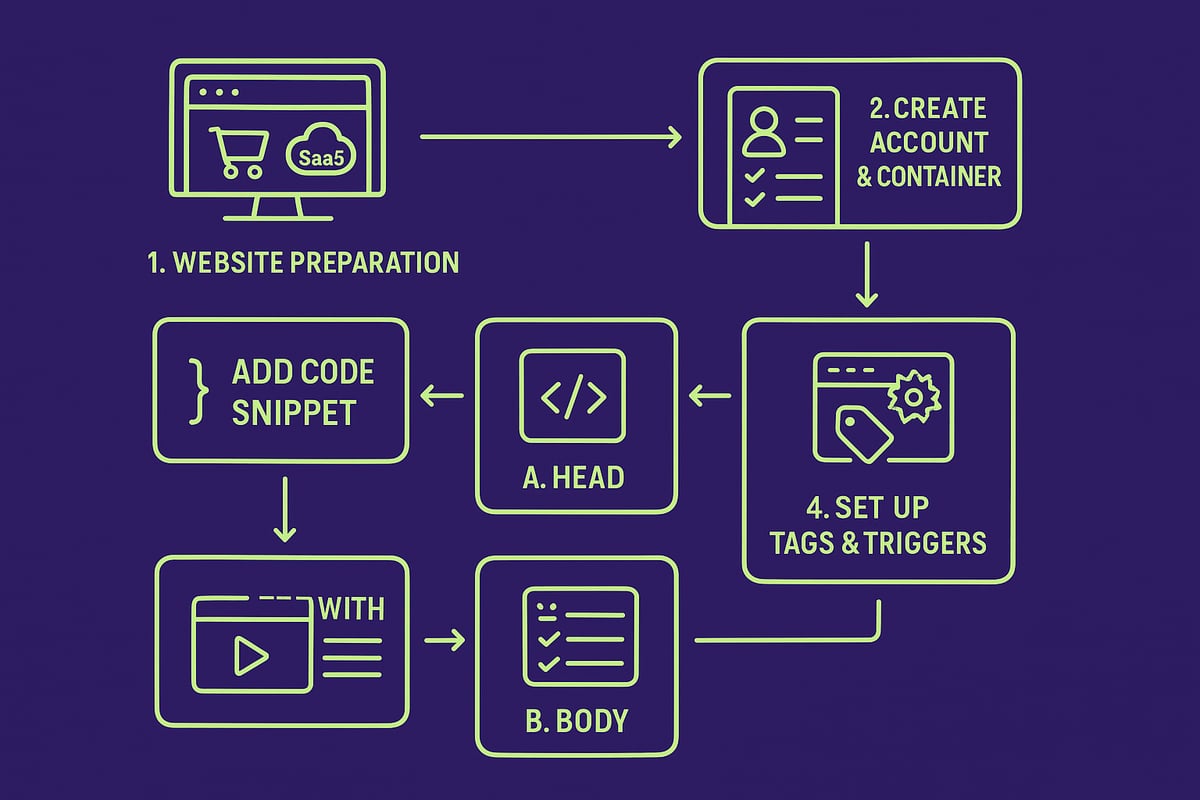
Before you deploy google gtm code, assess your website's readiness. Ensure your CMS or platform supports script tags, and check for any conflicting tag management systems.
Back up your website files and database. This precaution makes rollback easy if issues arise. Next, identify key pages and user actions you want to track, like product views, signups, and purchases.
Checklist for eCommerce and SaaS Sites:
| Task | Status |
|---|---|
| CMS supports custom scripts | [ ] |
| No conflicting tag managers present | [ ] |
| Site backup completed | [ ] |
| List of essential pages/events | [ ] |
| Team notified about changes | [ ] |
This groundwork ensures smooth integration and accurate data flow once google gtm code is live.
Creating Your GTM Account and Container
To start, navigate to the Google Tag Manager site and sign in with your business Google account. Click "Create Account," enter your organization name, and follow prompts to set up your container. Select your target platform (Web, AMP, iOS, or Android) based on your site.
Organize containers by website, brand, or client to streamline management—especially for agencies or businesses with multiple domains. Assign user roles with least-privilege access to maintain security and workflow efficiency.
For those integrating with platforms like HubSpot, follow this how to do a HubSpot integration guide to enable seamless CRM and analytics tracking within your google gtm code environment.
Installing the GTM Code Snippet
Once your container is ready, Google provides two snippets of google gtm code: one for the <head> and one for the <body> of your site's HTML. Copy the <head> snippet and paste it as close to the top of your HTML as possible. Then, place the <body> snippet immediately after the opening <body> tag.
<!-- Google Tag Manager (head) -->
<script>...GTM code...</script>
<!-- End Google Tag Manager (head) -->

<!-- Google Tag Manager (body) -->
<noscript><iframe src="..."></iframe></noscript>
<!-- End Google Tag Manager (body) -->
Use tools like Google Tag Assistant or GTM's Preview mode to verify installation. If the container isn't firing, check for typos, misplaced code, or caching issues.
Setting Up Your First Tag, Trigger, and Variable
With the google gtm code installed, create your first tag. Start with a Google Analytics 4 tag to capture essential website traffic data. In GTM, click "Add a new tag," choose the GA4 template, and enter your Measurement ID.
Configure a trigger for "Page View" events to ensure the tag fires on every page load. For variables, set up built-in options like Page URL and Referrer, or create custom variables for dynamic data such as transaction values.
Want to track form submissions? Add a trigger for the "Form Submission" event, and use variables to capture user input fields. This flexibility allows your google gtm code to adapt to nearly any business need.
Testing and Publishing Your GTM Setup
Before publishing, enter GTM's Preview and Debug mode. This lets you see tags, triggers, and variables in action without affecting live data. Double-check that all desired events are tracked and the google gtm code is firing as expected.
Validate the data flow by reviewing real-time reports in Google Analytics or your chosen platform. When satisfied, publish your changes and use GTM's built-in version control to document updates. According to Databox, 64 percent of GTM users report fewer tracking errors after thorough testing, highlighting the value of this step.
A disciplined approach to testing and publishing ensures your google gtm code delivers reliable, actionable insights for your marketing team.
Advanced GTM Code Strategies for Marketers and Developers
Mastering advanced strategies with google gtm code gives marketers and developers a competitive edge in 2026. The right approach unlocks powerful tracking, automation, and data-driven decision-making. Let’s break down the most impactful tactics you can use today.
Leveraging Custom JavaScript and HTML Tags
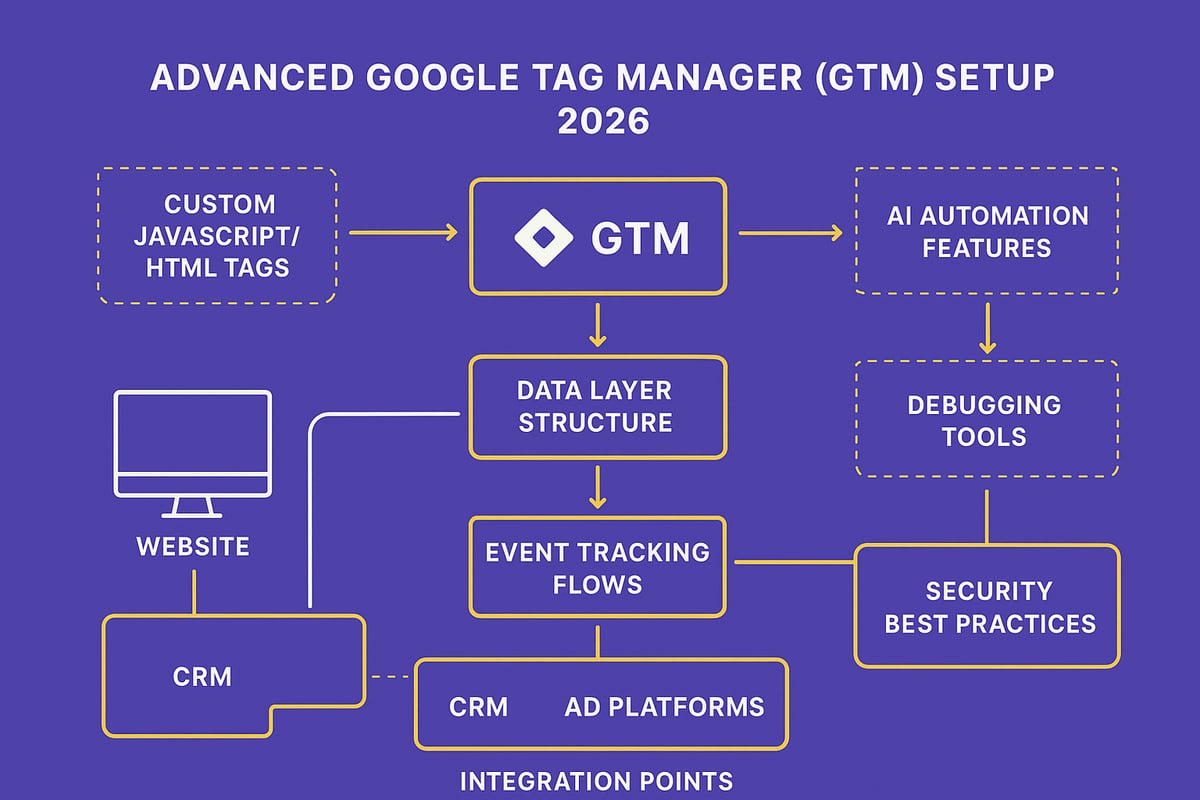
Custom JavaScript and HTML tags in google gtm code enable you to deploy tracking scripts, conversion pixels, and even complex schema markup without touching the site’s core codebase.
When should you use custom tags? Opt for them when built-in templates fall short—think unique analytics needs, new ad platforms, or advanced SEO enhancements. For example, you can inject schema.org markup to enhance search engine visibility:
<script type="application/ld+json">
{
  "@context": "https://schema.org",
  "@type": "Product",
  "name": "GTM Advanced Handbook",
  "brand": "MarketingPro"
}
</script>
Security is critical.
- Always audit third-party code before deploying.
- Use GTM’s built-in security features to limit access.
- Review the GTM Security & Privacy Hub for best practices.
Custom tags give you flexibility, but always monitor for vulnerabilities. Google gtm code, when managed well, keeps your marketing stack agile and secure.
Event Tracking and Conversion Optimization
Event tracking is the backbone of modern analytics strategies. With google gtm code, you can capture granular user interactions—scrolls, downloads, video plays, or even micro-conversions that often go unnoticed.
Set up enhanced eCommerce tracking to monitor product impressions, add-to-cart actions, and checkouts. To track micro-conversions, create triggers for actions like button clicks or PDF downloads. For instance, configure a trigger for form submissions:
- Choose "Form Submission" as the trigger type.
- Apply filters using variables (form ID, page path).
- Link to a custom event tag in google gtm code.
Case in point: A B2B SaaS firm used event tracking to identify high-intent leads, boosting their lead generation rate by 30 percent. By measuring what matters, you can optimize conversion funnels with precision.
Google gtm code empowers you to iterate quickly, test new hypotheses, and refine marketing performance with real-time feedback.
Data Layer Mastery: Structuring for Scalability
The data layer is the foundation for advanced google gtm code implementations. It acts as a centralized hub, passing structured data from your site to GTM tags and triggers.
Why does this matter in 2026? Digital experiences are increasingly personalized. A well-structured data layer lets you track user journeys, purchase details, and behavioral signals at scale.
Tips for scalable data layer design:
- Use clear, consistent naming conventions.
- Push dynamic data (like user IDs or cart values) with each event.
- Document your data layer structure for team clarity.
For a deep dive into best practices and accuracy, review the GTM Data Layer Implementation Guide.
Here’s a sample data layer push:
window.dataLayer = window.dataLayer || [];
window.dataLayer.push({
  'event': 'purchase',
  'transactionId': 'TX123',
  'revenue': 299.99,
  'userType': 'returning'
});
With robust google gtm code and a strategic data layer, you can personalize experiences and drive smarter decision-making.
Debugging and Troubleshooting GTM Code
Even the best google gtm code setups encounter issues. Debugging is essential for accuracy and reliability.
Common pain points:
- Tags firing out of order
- Duplicate or missing tags
- Data discrepancies between platforms
Start with GTM’s Preview and Debug mode. Use browser add-ons like Tag Assistant to verify tag firing and data flow. For cross-domain tracking issues, ensure linker parameters are correctly set up in both containers.
Create a troubleshooting checklist:
- Confirm trigger conditions and variables.
- Check for conflicting tags or scripts.
- Monitor real-time analytics for anomalies.
By maintaining a disciplined debugging process, you can minimize errors and maximize the value of your google gtm code.
Integrating GTM with Third-Party Tools and Platforms
Google gtm code acts as the connective tissue for your entire marketing stack. Integration with CRM systems, ad platforms, and A/B testing tools is seamless.
For example, adding the LinkedIn Insight Tag:
- Create a new custom HTML tag in GTM.
- Paste the LinkedIn script and set a trigger for all pages.
- Test with GTM’s Preview mode before publishing.
Enterprise marketers rely on google gtm code to unify tracking across channels. According to Martech.org, 85 percent of large organizations use GTM for multi-platform integration.
The result? Cohesive data, streamlined reporting, and the flexibility to scale as your business grows.
GTM Code Compliance, Privacy, and Security in 2026
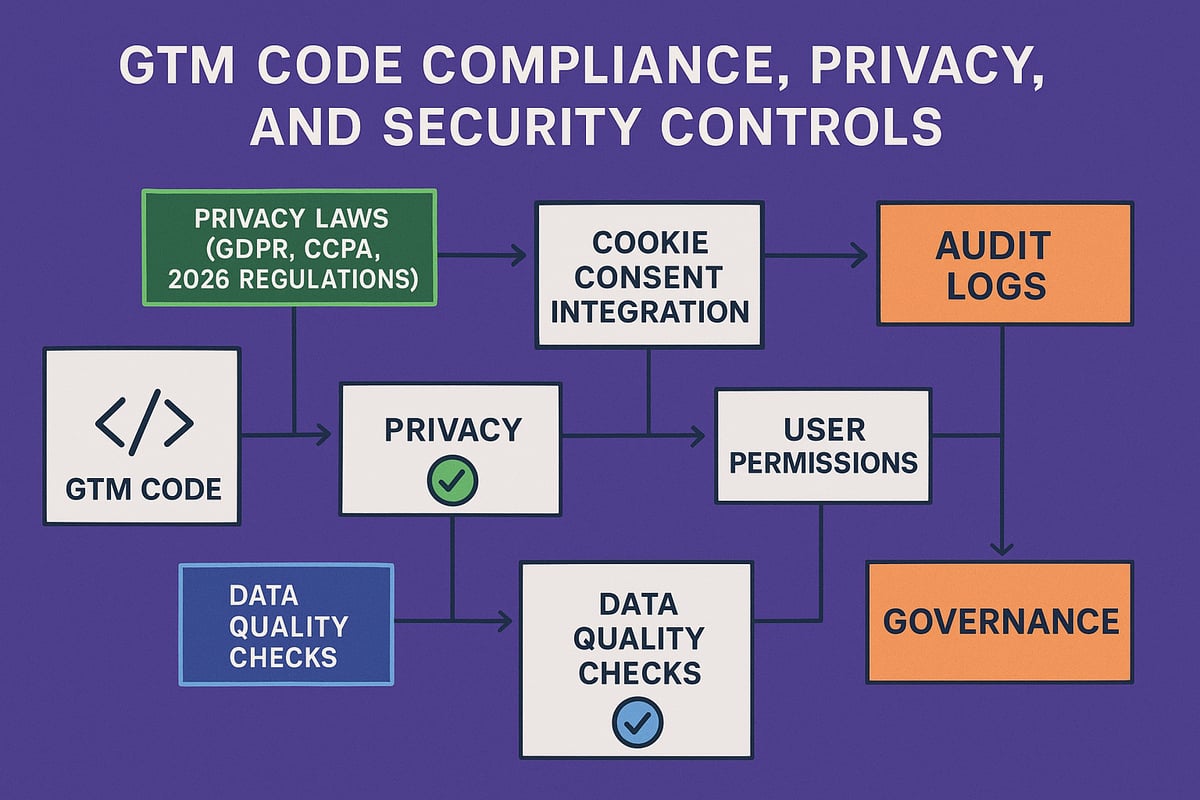
As digital privacy expectations rise, organizations must treat google gtm code compliance as a top priority. New global regulations, security threats, and the demand for clean data mean that every marketer and developer needs to master privacy and protection in their tag management strategy.
Navigating Global Data Privacy Laws
In 2026, privacy regulations are more complex than ever. Laws like GDPR and CCPA have new amendments, while additional countries introduce their own rules. For businesses using google gtm code, understanding how these laws impact tag deployment is essential.
With GDPR, organizations must ensure that personal data is only tracked after explicit user consent. The google gtm code should be configured to work with modern cookie consent platforms, pausing all non-essential tags until users agree. For CCPA, the requirements focus on transparency and the right to opt out of data selling. Integrating google gtm code with consent management solutions is now standard practice. For a deep dive into practical steps, check out GTM and CCPA Compliance.
Consider this example: an EU-based eCommerce site implements consent mode, ensuring analytics tags only fire if visitors grant permission. This not only keeps the company compliant but also builds user trust.
Key steps for compliance:
- Audit all tags for data collection practices.
- Use built-in consent checks within google gtm code.
- Document user consent and tag firing history.
- Regularly update consent banners to reflect new regulations.
The landscape is always shifting, so stay informed about updates and best practices for global privacy.
Securing Your GTM Implementation
Security is a non-negotiable aspect of managing google gtm code. As tag management systems become more powerful, they can also be targeted for malicious attacks, such as tag injection or unauthorized access.
To protect your implementation:
- Restrict GTM account access using granular user permissions.
- Enable two-factor authentication for all users.
- Maintain detailed audit logs to track every change in google gtm code.
- Regularly review published containers for unexpected tags.
- Use custom templates cautiously and avoid copying code from untrusted sources.
Consider a real-world scenario: a major retailer experienced a data breach in 2025 when an attacker exploited poorly managed permissions in their google gtm code. The breach was quickly contained because the team had robust audit logs and immediate rollback capabilities.
Security is not a one-time setup. Schedule regular reviews and train your team to recognize potential threats. The right controls transform google gtm code from a risk to a secure foundation for your marketing stack.
Ensuring Data Quality and Governance
A robust governance strategy is the backbone of any google gtm code deployment. Without proper controls, misconfigured tags can lead to data loss, duplicate tracking, or even compliance violations.
Best practices for data quality include:
- Establishing clear naming conventions for all tags, triggers, and variables.
- Documenting every tag’s purpose and data flow.
- Using GTM’s built-in version control for safe rollbacks.
- Scheduling regular audits to catch orphaned or outdated code.
A recent study found that 70% of data breaches in 2025 were due to misconfigured tags. This highlights the need for disciplined management of google gtm code. By prioritizing documentation and consistent processes, your data remains clean, accurate, and actionable.
Strong governance not only reduces risk, it also empowers your team to innovate confidently. Make data quality a continuous priority in your GTM strategy.
Future-Proofing Your GTM Code: Trends and Best Practices for 2026
Staying ahead in digital analytics means future-proofing your google gtm code. As privacy rules tighten and technology evolves, a proactive approach is essential. This section breaks down the trends and best practices you need to keep your GTM deployment agile and effective in 2026.
Adapting to Evolving Browser and Platform Changes
Browsers are phasing out third-party cookies, and privacy-first web standards are reshaping how data is collected. To future-proof your google gtm code, migrate to server-side tagging. This approach shifts data processing from the browser to your own server, giving you more control and compliance.
GTM is rolling out new features for handling consent and privacy. Adapting your setup to use these tools will keep your tags firing reliably, even as browser restrictions grow. If you want a deeper dive into privacy and compliance strategies, check out the GTM Best Practices 2025 guide for actionable insights.
Migrating to server-side GTM containers also boosts data quality and resilience. Start planning your transition now to avoid disruption as standards shift.
Automation and AI in GTM Workflows
Automation is transforming how marketing teams manage google gtm code. AI-driven features streamline tag deployment, monitor data flows, and reduce manual errors. In 2026, expect to see more tools that automatically detect tracking issues and suggest optimizations.
Enterprise teams are adopting AI-powered solutions for real-time monitoring and predictive analytics. These technologies minimize downtime and ensure your tags deliver accurate data. Explore the latest AI tools for marketing automation to see how they can enhance your GTM workflows.
Embracing automation not only saves time but also positions your team to adapt quickly as new marketing technologies emerge.
Maintaining Performance and Scalability
As your site grows, maintaining efficient google gtm code becomes critical. Large containers and excessive tags can slow down page load times. Optimize tag firing by setting precise triggers and using built-in templates instead of custom code where possible.
Here's a quick performance audit checklist for high-traffic sites:
| Audit Step | Description |
|---|---|
| Remove unused tags | Clean up legacy or inactive tags |
| Group similar triggers | Consolidate triggers for efficiency |
| Limit custom JavaScript | Use only when necessary |
| Test with GTM Preview | Spot bottlenecks before publishing |
Regular audits keep your GTM setup lean and fast, supporting a better user experience and reliable analytics.
Building a GTM Center of Excellence
Empowering your team starts with structured training on google gtm code best practices. Establish internal documentation, naming conventions, and clear processes for tag governance. This reduces errors and accelerates onboarding for new team members.
Leverage community resources, online forums, and template libraries to stay updated on new features. Encourage knowledge sharing and periodic reviews of your GTM setup to maintain high standards.
A GTM Center of Excellence drives consistency and ensures your organization benefits from the latest advancements in tag management.
Measuring Success: KPIs and Reporting
To evaluate the impact of your google gtm code, define key performance indicators (KPIs) that align with business goals. Monitor metrics like tag firing accuracy, data completeness, and site performance.
Automated reporting solutions can deliver real-time dashboards to stakeholders, highlighting trends and areas for improvement. Companies with mature GTM practices report a 35% boost in marketing ROI, demonstrating the tangible value of a well-optimized setup.
By tracking these metrics, you ensure your GTM deployment remains effective and adaptable as digital marketing evolves.