With the rise of stricter digital privacy regulations, the pressure to secure your website’s analytics and marketing tags is at an all-time high. One overlooked vulnerability can put your data and reputation at risk.
This guide focuses on google tag manager csp, offering a clear, actionable roadmap to protect your business in 2026. You’ll discover why Content Security Policy is vital, the latest best practices for GTM and CSP, and step-by-step instructions for a secure setup.
Ready to safeguard your site and future-proof your tag management? Dive in and take control of your website’s security now.
Understanding Google Tag Manager and Content Security Policy
Today’s digital landscape demands both speed and security. To manage analytics and marketing tags safely, you need to understand the basics of google tag manager csp and how they work together. Let’s break down each component and see why their integration matters in 2026.
What is Google Tag Manager?
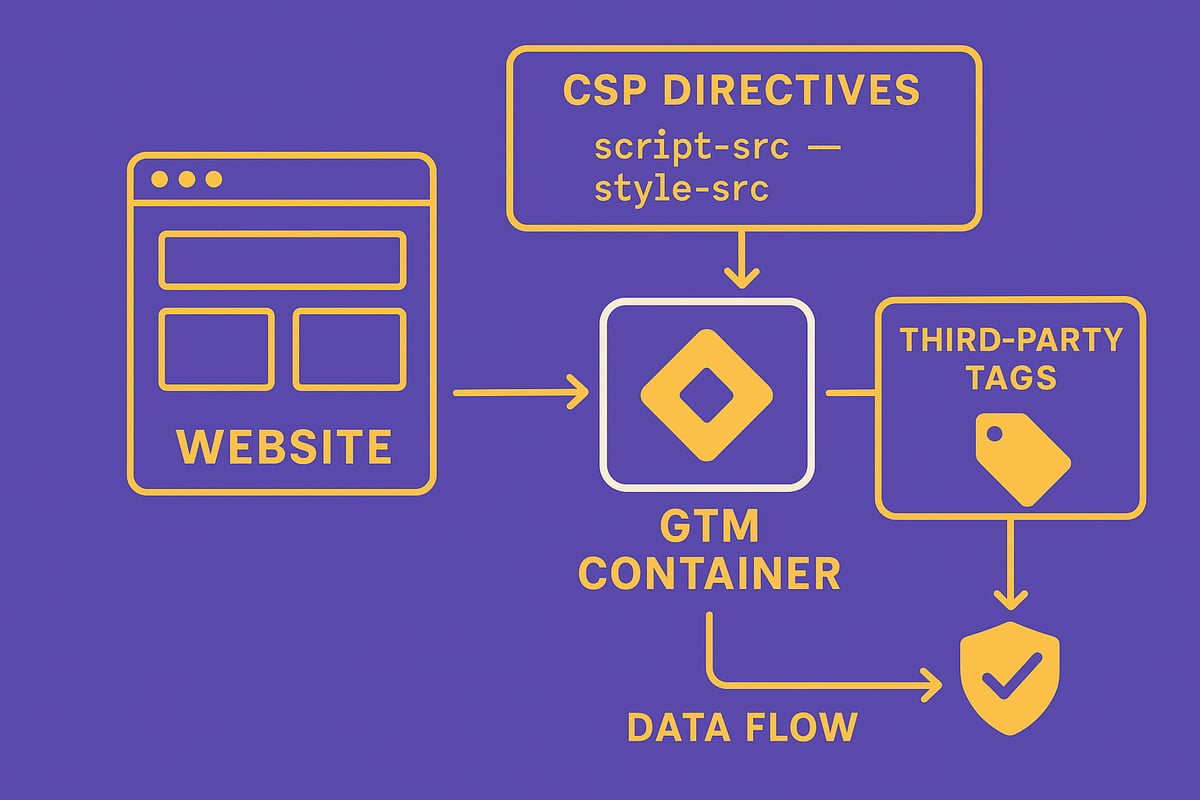
Google Tag Manager (GTM) is a centralized platform that lets you manage all your website tags without direct code changes. With GTM, marketing and analytics teams can add, update, or remove tracking scripts through a user-friendly dashboard.
The benefits of GTM include:
- Streamlined tag deployment across multiple pages
- Enhanced control over event tracking, conversion pixels, and remarketing tags
- Quick integration with other Google tools like Analytics and Ads
For example, if your team wants to launch a new campaign, GTM makes it easy to add conversion tracking without developer support. This agility is essential, but it also increases the need for a secure google tag manager csp setup to prevent vulnerabilities.
What is Content Security Policy?
Content Security Policy (CSP) is a security standard that helps protect websites from cross-site scripting (XSS) and code injection attacks. By defining which sources of scripts, styles, and other resources are allowed, CSP limits the risk of malicious code running on your site.
Key CSP directives include:
script-src: Controls allowed JavaScript sourcesstyle-src: Restricts CSS originsimg-src: Specifies trusted image sources
CSP is crucial for regulatory compliance, especially with GDPR and CCPA requirements for data protection. For instance, a strong CSP can block unauthorized scripts that might steal user data. To learn more, check out Google’s Use Tag Manager with a Content Security Policy guide for best practices on google tag manager csp integration.
Why GTM and CSP Integration is Critical in 2026
The threat landscape is evolving. According to recent studies, web-based attacks are rising, with over 30% targeting script-based vulnerabilities. In 2026, stricter privacy laws and security regulations will make it mandatory to secure your tag management setup.
Google now recommends integrating CSP directly with GTM to reduce risks. Real-world incidents, like compromised tags leading to data breaches, highlight the urgency. Balancing marketing flexibility with robust security starts with a thoughtful google tag manager csp approach.
Common Challenges in Combining GTM and CSP
Integrating google tag manager csp isn’t always straightforward. Dynamic scripts and inline code often trigger CSP violations, making some tags difficult to implement.
Common obstacles include:
- Managing third-party scripts that require extra permissions
- Debugging CSP errors that block analytics or marketing tags
- Ensuring website performance and analytics data remain accurate
Many teams mistakenly believe GTM and CSP are incompatible. In reality, with careful planning and updated practices, you can achieve both secure and agile tag management.
Preparing for a Secure GTM+CSP Setup
A secure google tag manager csp setup starts with a meticulous review of your website’s current tag landscape. Careful preparation reduces risk, ensures compliance, and sets the foundation for robust analytics and marketing performance.

Auditing Your Current Tag Implementation
Begin by cataloging every tag and script running on your site. Identify all sources of inline scripts and external resources, including those injected by third-party vendors. Use browser developer tools and solutions like Google Tag Assistant to uncover hidden or legacy tags.
Assess the risk each tag poses: focus on those with broad permissions or those loading from unfamiliar domains. Document your findings in a centralized inventory, noting scripts that could conflict with a secure google tag manager csp rollout.
For step-by-step auditing, consult guides such as How to audit tag implementation. This ensures no detail is missed.
Reviewing Existing CSP Policies
Locate current CSP headers in your server configuration or meta tags. Carefully interpret these policies to spot gaps or overly permissive rules. Common mistakes include allowing unsafe-inline scripts or wildcard domains, which weaken defenses.
Compare your policy against strong and weak examples. For instance, a strong policy restricts script-src to trusted domains and avoids unsafe-eval. Prepare for stricter enforcement in 2026 by tightening directives now, aligning with google tag manager csp best practices.
Document all changes and their impact, setting a clear baseline for future adjustments.
Setting Security Objectives and Compliance Goals
Align your google tag manager csp strategy with business objectives and regulatory needs. Define what constitutes acceptable risk for marketing and analytics teams, ensuring your approach supports both security and performance.
Involve stakeholders from IT, marketing, and compliance early. Balance robust data collection with user privacy by setting clear, measurable KPIs for security. Objectives may include zero CSP violations, full GDPR compliance, or reducing third-party script reliance.
Having shared goals keeps all teams accountable and focused on long-term success.
Building a GTM+CSP Implementation Plan
Develop a structured plan for your google tag manager csp deployment. Set a timeline with clear milestones, such as policy drafting, testing, and rollout phases. Assign responsibilities to IT specialists, marketers, and compliance officers to ensure smooth collaboration.
Establish communication channels for quick issue resolution and updates. Select tools for monitoring and validating CSP compliance, and outline procedures for ongoing maintenance. Plan for regular reviews and updates as the digital landscape evolves.
A comprehensive plan ensures your setup remains secure and adaptable to future changes.
Step-by-Step Guide: Secure Google Tag Manager CSP Setup for 2026
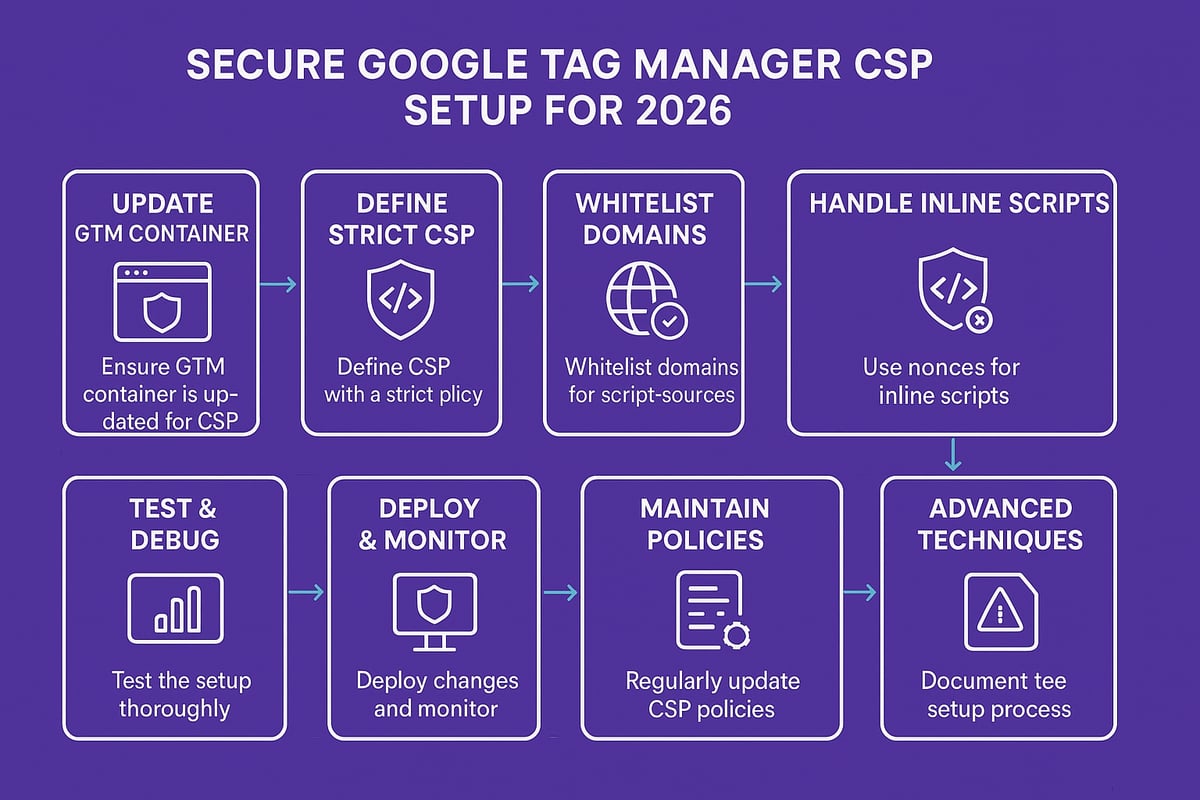
Securing your analytics and marketing stack for 2026 calls for a meticulous approach to google tag manager csp configuration. This guide breaks the process into actionable steps, each designed to fortify your tag management against modern threats. Let’s walk through the essential actions for a robust and compliant setup.
Step 1: Update and Configure GTM Container
Start by ensuring your google tag manager csp journey begins with an up-to-date GTM container. Log into your GTM account and check for any available updates or deprecated features.
Limit user access by following the principle of least privilege. Only grant permissions to team members who need them. Disable any unnecessary built-in or third-party tags that are not actively used.
Enable two-factor authentication to provide an extra layer of security for your GTM accounts. Always document every container change. This creates an audit trail, making future reviews of your google tag manager csp setup more efficient.
Step 2: Define a Baseline CSP Policy
Begin your google tag manager csp implementation by establishing a strict baseline policy. Set the default-src directive to 'none' and only allow trusted domains, such as www.googletagmanager.com.
Avoid unsafe-inline and unsafe-eval values in your script policies. Instead, use report-only mode initially to monitor the impact without disrupting your site.
Here’s a sample baseline CSP:
Content-Security-Policy: default-src 'none'; script-src 'self' www.googletagmanager.com; object-src 'none'; style-src 'self';
Iteratively adjust this policy as your google tag manager csp integration requires.
Step 3: Whitelist Required GTM and Analytics Domains
To ensure your google tag manager csp setup functions properly, you must explicitly whitelist all necessary domains. Identify every Google domain your setup relies on, such as www.googletagmanager.com and www.google-analytics.com.
Document every domain added to your CSP. Avoid using wildcards, as they increase exposure to malicious actors. For reference, the CSP-Friendly GTM Setup: Secure Tracking & Analytics Guide offers valuable techniques for secure domain whitelisting.
Sample CSP directives:
script-src 'self' www.googletagmanager.com www.google-analytics.com;
img-src 'self' www.google-analytics.com;
Keep your google tag manager csp documentation updated as you add new vendors.
Step 4: Handling Inline Scripts and Nonces
Inline scripts can break your google tag manager csp policy and expose your site to XSS risks. Instead of inline code, use GTM’s custom templates, which allow you to maintain security and flexibility.
When inline scripts are unavoidable, implement nonces or hashes. Many frameworks can automate nonce generation for you. Here’s an example of a nonce in a CSP header:
Content-Security-Policy: script-src 'nonce-<RANDOM_VALUE>' www.googletagmanager.com;
Apply nonces consistently across your google tag manager csp setup for maximum protection.
Step 5: Testing and Debugging CSP Violations
Testing is vital for a secure google tag manager csp deployment. Use browser developer tools to monitor CSP violation reports. Set up a dedicated reporting endpoint to capture these events for analysis.
Look for false positives and iteratively refine your policy. Automated tools can help validate your CSP and simulate attacks. Regularly test your configuration to ensure your google tag manager csp does not block legitimate analytics or marketing tags.
Step 6: Deploying and Monitoring the Secure Setup
Before rolling out your google tag manager csp changes, deploy them in a staging environment. This allows your team to catch issues without affecting live users.
Communicate upcoming changes to all stakeholders, including IT, marketing, and compliance. After launch, monitor real-time CSP violation reports. Establish an incident response plan to address any critical issues quickly.
Schedule regular reviews of both your tag setup and google tag manager csp policy to ensure ongoing security.
Step 7: Maintaining and Updating Policies for Ongoing Security
A secure google tag manager csp setup is not a one-time project. As you add new tags or vendors, revisit your CSP to ensure continued compliance.
Review third-party tag requests for security impact before adding them. Where possible, automate policy updates using scripts or CI/CD pipelines. Train your team on best practices for tag management security.
Stay proactive to ensure your google tag manager csp remains resilient as threats evolve.
Step 8: Advanced Techniques for High-Security Environments
If your site demands the highest level of security, enhance your google tag manager csp strategy with advanced measures. Consider server-side GTM for greater control over data flows.
Implement Subresource Integrity (SRI) to verify the authenticity of external scripts. Use strict-dynamic and enforce higher CSP levels. Integrate your CSP with a Web Application Firewall for even more robust defense.
Industries like finance and healthcare often require these google tag manager csp enhancements.
Step 9: Documenting and Communicating Your CSP Strategy
Thorough documentation is the backbone of a sustainable google tag manager csp program. Create clear guides for both IT and marketing, detailing your CSP and GTM configurations.
Use version control to track changes. Provide violation logs to compliance teams and share best practices internally. Be audit-ready by keeping documentation current and accessible.
Effective communication ensures everyone understands the importance of your google tag manager csp strategy and can act accordingly.
Troubleshooting Common GTM+CSP Issues
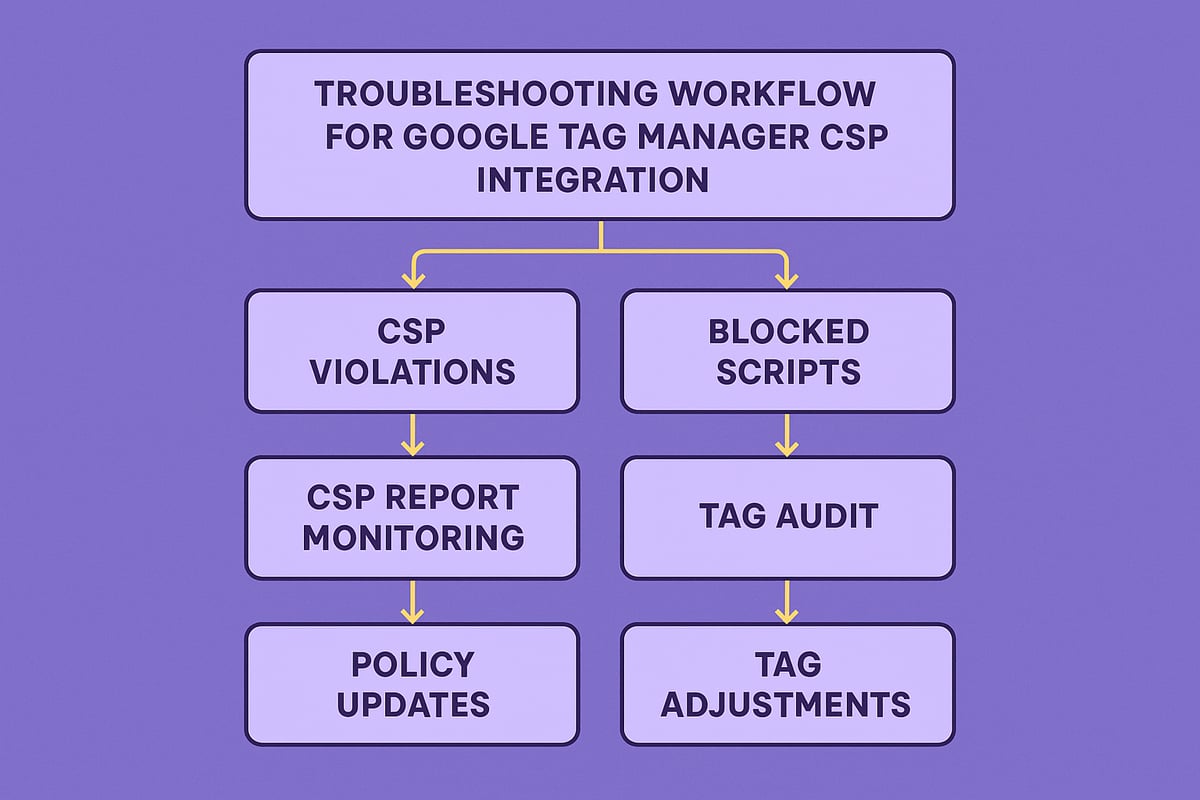
Troubleshooting is an essential part of deploying a secure google tag manager csp setup. Even experienced teams face configuration challenges, especially as CSP policies become stricter. The following sections break down the most common roadblocks and guide you through effective solutions.
Frequent CSP Errors with GTM
When implementing google tag manager csp, teams often encounter errors such as “Refused to execute inline script” or blocked third-party resources. These issues can prevent analytics tags from firing and disrupt marketing campaigns.
- Inline scripts are blocked by default, causing GTM triggers or variables to fail.
- External resources like fonts or images may be restricted if not explicitly whitelisted.
- Analytics and remarketing tags can silently fail due to missing domains in your CSP.
To resolve these, review CSP violation reports and use browser developer tools to pinpoint the exact cause. For a deeper dive into protecting your setup, consult Google Tag Manager Security: 5 Steps to Stop Skimmers and Protect Your Data for actionable best practices.
Resolving Tag Conflicts and Third-Party Script Issues
Integrating new marketing or analytics tools often requires updating your google tag manager csp policy. Many third-party scripts demand additional permissions, which, if not managed carefully, can weaken your security posture.
- Always audit new vendor requirements before adding them to your CSP.
- Limit exceptions and avoid wildcard domains whenever possible.
- Coordinate with vendors for CSP-compliant script versions.
When conflicts arise, document changes and communicate with stakeholders to ensure clarity. This proactive approach reduces the risk of accidental data exposure and keeps your tag environment secure.
Debugging in Production Environments
Testing google tag manager csp changes in production is risky but sometimes unavoidable. To minimize impact, use CSP’s report-only mode, allowing you to monitor violations without blocking content.
- Deploy changes to a staging environment first to catch errors early.
- Set up automated alerts for real-time violation reports.
- Roll back problematic policy updates quickly if user experience is affected.
Leverage monitoring tools to continuously track CSP and tag performance. A robust incident response plan ensures issues are resolved without compromising analytics or site functionality.
Ensuring Analytics Accuracy Without Compromising Security
Balancing strict google tag manager csp enforcement with reliable analytics is a challenge. Blocked tags can lead to data loss or incomplete reporting, impacting business decisions.
- Test analytics thoroughly after each CSP update.
- Maintain close communication between IT and marketing teams regarding policy changes.
- Monitor data trends for unexpected drops or anomalies.
For more insights on optimizing analytics while maintaining security, explore this comprehensive guide to analytics tools. Adopting these best practices ensures your analytics remain accurate, even as you strengthen your security.
Future-Proofing Your GTM and CSP Strategy for 2026 and Beyond
Staying ahead in web security requires proactive planning. As you build your google tag manager csp framework for 2026, anticipate changes, monitor threats, and adapt your approach to protect your website and user data.
Anticipated Changes in CSP Standards and Browser Support
CSP standards are evolving rapidly. By 2026, browsers like Chrome, Firefox, Safari, and Edge will enforce stricter rules and deprecate legacy practices. Watch for new directives, changes in inline script handling, and improved reporting mechanisms. Stay updated by following W3C and browser vendor announcements. Microsoft's SharePoint Online Content Security Policy Enforcement Dates and Guidance highlights how major platforms are prioritizing CSP. To maintain a compliant google tag manager csp setup, review browser roadmaps regularly and plan updates before enforcement deadlines.
Evolving Threats and Security Trends
Attackers are becoming more sophisticated, targeting analytics tags and marketing scripts. Recent breaches show that supply chain attacks and XSS techniques continue to evolve. A robust google tag manager csp strategy requires continuous threat assessment and regular updates. Monitor CSP violation reports for unusual patterns, and join security communities to track new exploits. Adopt a proactive security posture by scheduling quarterly reviews and penetration tests. These steps help ensure your defenses keep pace with the shifting threat landscape.
Best Practices for Scalable and Flexible Tag Management
Scalability and flexibility are vital for modern tag management. Modularize your google tag manager csp policies to enable agile updates and reduce errors. Automate tag deployment and policy changes where possible. Foster secure collaboration between IT and marketing by using governance frameworks. For inspiration, review Outbound marketing strategies for 2026 to understand how secure, data-driven practices can boost performance. Enterprises benefit from clear documentation, version control, and regular training to maintain a secure, efficient tag ecosystem.
Preparing for Regulatory and Compliance Changes
Privacy laws such as GDPR and CCPA continue to evolve, impacting how you manage your google tag manager csp. Monitor global regulations to anticipate new requirements. Integrate compliance checks into your deployment pipeline, and document policy changes for audit readiness. Communicate your privacy and security practices to stakeholders, building trust and transparency. By fostering a culture of compliance and security, your organization will be well positioned to adapt to future regulatory shifts.